Difference between revisions of "File:Install Philips Hue.jpg"
Jump to navigation
Jump to search
(Connect the Philips Hue Bridge to the router via Ethernet cable and plug it into an electrical outlet. https://www.homeandsmart.de/philips-hue-einrichten-und-verbinden-mit-bridge-und-smartphone#:~:text=Hierzu%20einfach%20das%20Kabel%20rechts,Hue%2DLam...) |
NKirnbauer (talk | contribs) m (source) |
||
| Line 2: | Line 2: | ||
Connect the Philips Hue Bridge to the router via Ethernet cable and plug it into an electrical outlet. | Connect the Philips Hue Bridge to the router via Ethernet cable and plug it into an electrical outlet. | ||
== Source == | |||
https://www.homeandsmart.de/philips-hue-einrichten-und-verbinden-mit-bridge-und-smartphone#:~:text=Hierzu%20einfach%20das%20Kabel%20rechts,Hue%2DLampen%20bereits%20automatisch%20verbunden | https://www.homeandsmart.de/philips-hue-einrichten-und-verbinden-mit-bridge-und-smartphone#:~:text=Hierzu%20einfach%20das%20Kabel%20rechts,Hue%2DLampen%20bereits%20automatisch%20verbunden | ||


Latest revision as of 07:53, 2 October 2024
Summary
Connect the Philips Hue Bridge to the router via Ethernet cable and plug it into an electrical outlet.
Source
File history
Click on a date/time to view the file as it appeared at that time.
| Date/Time | Thumbnail | Dimensions | User | Comment | |
|---|---|---|---|---|---|
| current | 16:51, 11 July 2020 | 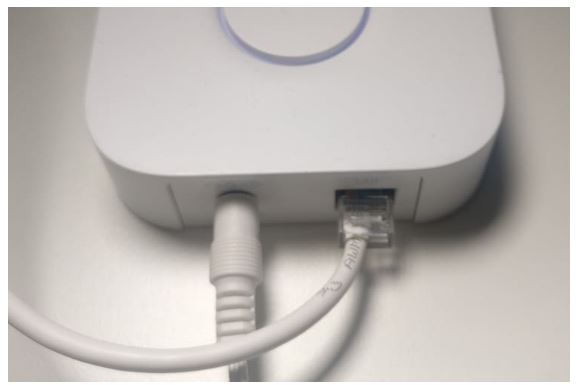 | 576 × 385 (15 KB) | CCinay (talk | contribs) | Connect the Philips Hue Bridge to the router via Ethernet cable and plug it into an electrical outlet. https://www.homeandsmart.de/philips-hue-einrichten-und-verbinden-mit-bridge-und-smartphone#:~:text=Hierzu%20einfach%20das%20Kabel%20rechts,Hue%2DLam... |
You cannot overwrite this file.
File usage
The following page uses this file:
